Observability
Capture correlated local evidence, redact it before storage, and export sampled telemetry without coupling handlers to a vendor.
Follow a request across routes, functions, and resources using RELKIT’s correlated logs and traces. Handlers write structured records through context.log; functions, providers, jobs, events, tools,
and agents contribute correlated spans without importing a telemetry SDK.
Pre-setup
Start with local logging and bounded capture; neither requires a telemetry account, exporter,
new defineEnv fields, or a Docker service. Merge these settings into your existing defineApp
configuration, retaining its environment contract:
/** Local telemetry works without a remote exporter or extra environment secrets. */
import { defineApp, defineEnv } from "@relkit/app/config";

export default defineApp({
  env: defineEnv({}),
  telemetry: {
    redaction: { mode: "development-redacted", maxBytes: 65_536 },
    localRetention: { maxRecords: 2_000, maxAgeMs: 3_600_000, maxBytes: 16_777_216 },
  },
});
Run bun run check and bun run dev, then send a request to an existing route to produce
correlated logs. For a UI, complete the separate Inspector setup:
installation alone does not enable its bridge. Keep your application’s Redis, MinIO, database,
and job providers in local Docker.
Remote Sentry/OTLP export is optional. Their integrations have no bundled Docker collector
recipe; configure a reachable service and supply its named endpoint/secret bindings only when
selecting that exporter. Those binding references are distinct from application context.env fields.
Configure one pipeline
Core logging and bounded capture need no exporter or Inspector installation. When selecting the commerce example’s exporters, install each chosen owner in the backend first. OTLP uses its own packaged implementation; Sentry also selects its native Bun SDK:
From this guide’s application/package root, install only its selected requirements:
bun add @relkit/otlp@0.7.12Keep these owner-specific versions and the lockfile together. Runtime SDKs belong in dependencies; build/type tooling belongs in devDependencies. Installing an adapter does not supply its optional SDK peers or enable the feature’s configuration.
From this guide’s application/package root, install only its selected requirements:
bun add @relkit/sentry@0.8.1 @sentry/bun@10.71.0Keep these owner-specific versions and the lockfile together. Runtime SDKs belong in dependencies; build/type tooling belongs in devDependencies. Installing an adapter does not supply its optional SDK peers or enable the feature’s configuration.
Use only the chosen exporter entries/imports in your existing configuration. Keeping both entries below selects both installations; copying telemetry settings never installs their optional packages.
The commerce application combines redacted local capture, bounded retention, export sampling, Sentry, and OTLP:
telemetry: {
  redaction: { mode: "development-redacted", maxBytes: 65_536 },
  localRetention: { maxRecords: 2_000, maxAgeMs: 3_600_000, maxBytes: 16_777_216 },
  exportSampling: { traceRate: 0.25, minimumLogLevel: "info" },
  exporters: {
    errors: sentry({
      dsn: binding.secret("SENTRY_DSN"),
      environment: binding.string("SENTRY_ENVIRONMENT"),
    }),
    traces: otlp({
      endpoint: binding.url("OTLP_ENDPOINT"),
      headers: { authorization: binding.secret("OTLP_AUTHORIZATION") },
      serviceName: "commerce-api",
    }),
  },
},
Sentry and OTLP are independent integrations. Their credentials and endpoints use named binding references, so resolved values do not enter the application graph or Inspector payloads.
Understand capture order
runtime event
→ canonical record
→ capture policy
→ redaction
→ bounded retention and live Inspector stream
→ root trace-consistent sampling
→ independent exporters
Local capture is independent of external sampling. With traceRate: 0.25, the bounded Inspector store can keep
a complete redacted local trace even when that trace is not selected for remote export. Spans, logs, and errors
with the same trace use the same deterministic trace decision. Log export also follows minimumLogLevel.
Configure traceRate: 1 when a Collector performs tail sampling and needs complete failed traces; RELKIT does
not keep a second in-process tail-sampling buffer.
localRetention bounds record count, age, and bytes. It is diagnostic evidence, not durable business storage.
Application logging and production telemetry use bounded memory unless a storage capability is explicitly supplied. They do not install or open DuckDB. Normal console output and external exporters remain usable without development history. The default memory store keeps at most 1,024 records and 4 MiB of encoded record payloads; explicit retention settings can lower or change those bounds.
Read development logs
bun run dev prints startup URLs, compilation and reload outcomes, HTTP completions, and application output.
The default terminal level is INFO. Use bun run dev -- --verbose for DEBUG events and retained error details,
--log-level warn to select an explicit threshold, --no-color for plain text, or --json for newline-delimited
records on stderr. An explicit level overrides verbose’s DEBUG selection. NO_COLOR and redirected output also
disable color. Terminal filtering does not reduce captured history.
Persistent development history belongs to the separately installed and launched
@relkit/inspector tool. Complete its install → bridge enablement → tool
startup procedure before using these views. It owns @relkit/observability-local, DuckDB and the Node
worker; the backend-only workflow continues to require only Bun.
The tool defaults to .relkit/observability/observability.duckdb under its selected project root.
Use the tool’s --history-directory option for an explicit persistent override. One Inspector writer
owns a history directory, which is bound to one project. Stopping/restarting the tool or reloading the
backend preserves committed history; removing a package-runner cache does not remove project history.
Before collection, an enabled backend bridge holds only a bounded redacted buffer, initially 2,048 records/2 MiB. With no running tool there is no new persisted tool history. Overflow or failed delivery is reported as incomplete capture; collector receipts acknowledge committed session/sequence records and deduplicate replay. Backend capture limits and tool history retention are separate budgets. Exporter delivery remains independent of collector acknowledgments.
The current store uses observability model v2. Moving store ownership preserves existing database schemas,
receipt identities, imported segment markers, and source history files. Incompatible development state is not
reset automatically: RELKIT reports RELKIT_OBSERVABILITY_STATE_INCOMPATIBLE and preserves the directory for
diagnosis. Diagnostic history does not own durable job, checkpoint, provider, or agent application state.
If storage fails, application requests continue. The Logs workspace reports degraded storage and failed or dropped records. Restart the Inspector after fixing the cause; records that failed to commit are not saved.
Redact before storage or export
development-redacted allows bounded invocation and operation input/output capture while replacing protected keys and known secret values.
maxBytes is required and prevents oversized content from being retained. Mode off omits protected payload
content entirely.
Use synthetic secrets in tests and assert that they do not appear in records, diagnostics, generated artifacts, or exporter payloads. Redaction is a safety boundary, not permission to log credentials.
Diagnose exporter health
Exporter fan-out is isolated. A failed Sentry or OTLP exporter cannot block application work or the other exporter. Failures increment health counters and create redacted local-only diagnostics that are not sent back through the failed exporter.
Start the app and follow one identifiable request:
bun run dev
curl http://localhost:3000/hello\?name=Telemetry \
  -H "x-correlation-id: docs-telemetry"
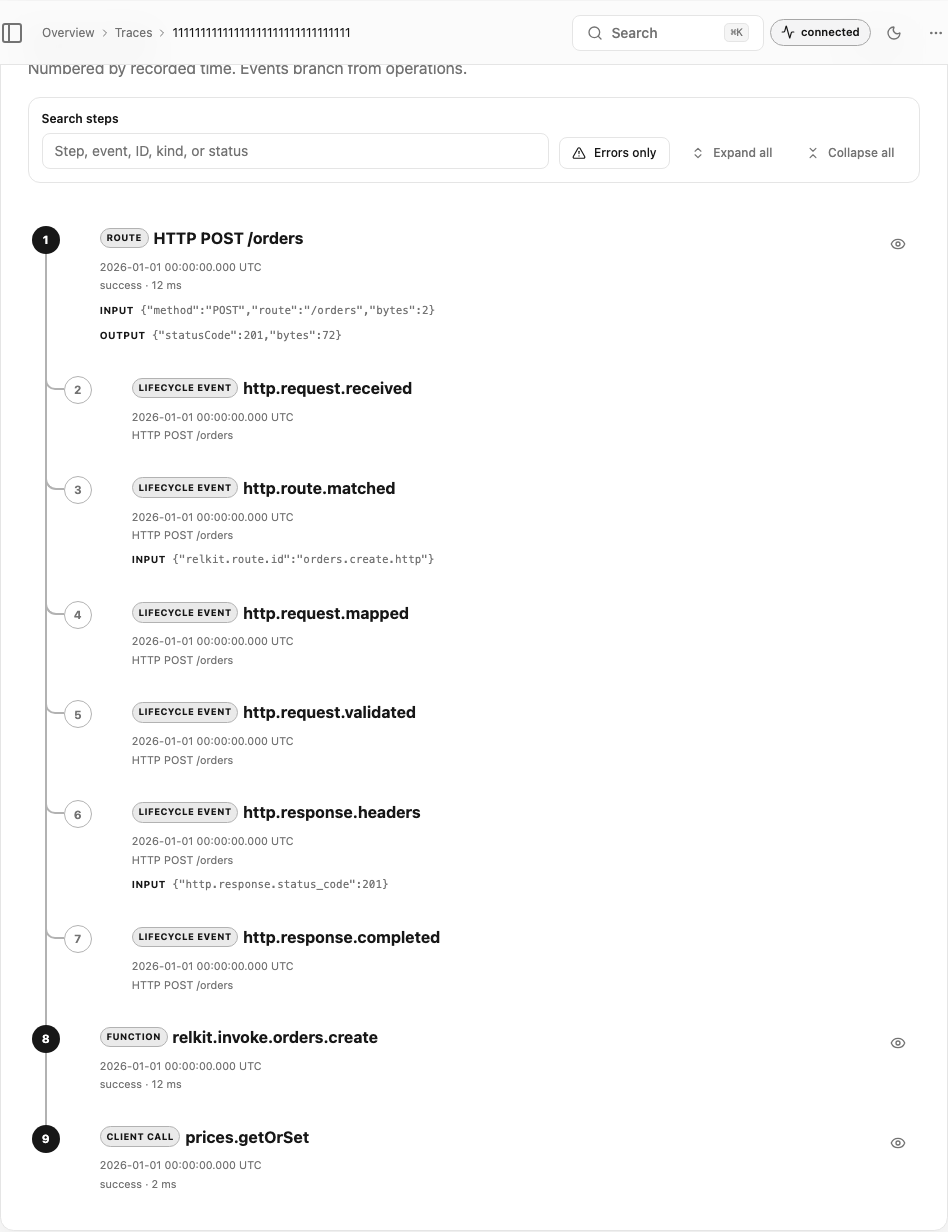
After the separate Inspector setup, open Requests, select /hello, and follow its trace, logs, graph hash, generation, and
activation fingerprint. The trace timeline numbers and connects spans and lifecycle events by their recorded
date/time, labels each operation type, and keeps overlapping duration bars visible for concurrent work. Select
a span to open the expanded sheet with separate input, output, outcome, and metadata sections alongside its
resource attributes, events, links, correlated logs,
and safe error details. Event and job continuations remain separate links because they can outlive the HTTP
response. If remote telemetry is silent, inspect exporter health, queue depth, failure count, and drop count
before assuming application capture failed.
Add application trace detail
RELKIT already creates spans for routes, functions, declared client operations, jobs, events, tools, and agents.
Use context.trace only for application work that those boundaries do not describe:
// Dependencies are accessed through the checked execution context.
const unitPrice = await context.trace.span(
  "pricing.calculate",
  { attributes: { "pricing.strategy": "catalog" } },
  () => context.cache.prices.getOrSet({ sku: input.sku }, async () => 1_000),
);
context.trace.event("pricing.calculated", { "pricing.unit_cents": unitPrice });
context.trace.setAttributes({ "pricing.quantity": input.quantity });| Operation | What it records |
|---|---|
span(name, callback) |
An internal child span around the callback |
span(name, { attributes, kind }, callback) |
A child span with initial attributes and kind internal or client |
event(name, attributes?) |
A point-in-time event on the active span |
setAttributes({ key: value }) |
Additional attributes on the active span |
The callback passed to span runs with a child span as the active span. RELKIT ends it on success or failure and
returns or rethrows the callback result unchanged. The default kind is internal; use client only for a custom
outbound dependency RELKIT does not already instrument. Nested and parallel callbacks keep the correct parent.
event adds a point-in-time event to the active span. setAttributes adds facts to that same active span, so a
call directly in a handler annotates the handler’s invocation span while a call inside span annotates the child.
There is no manual start or end API.
Attribute values are limited to strings, finite numbers, and booleans. Names beginning with relkit. and identity
keys such as traceId, spanId, and requestId are reserved for the runtime. Recording is bounded; Inspector
reports dropped or truncated data instead of implying that omitted telemetry was observed. Do not put secrets,
payloads, or high-cardinality values such as random IDs into attributes.
Inspect a trace and its logs
The trace view keeps nesting and overlapping work visible. Open a span to inspect its attributes, events, links, correlated logs, captured redacted input/output, outcome, and safe error details.
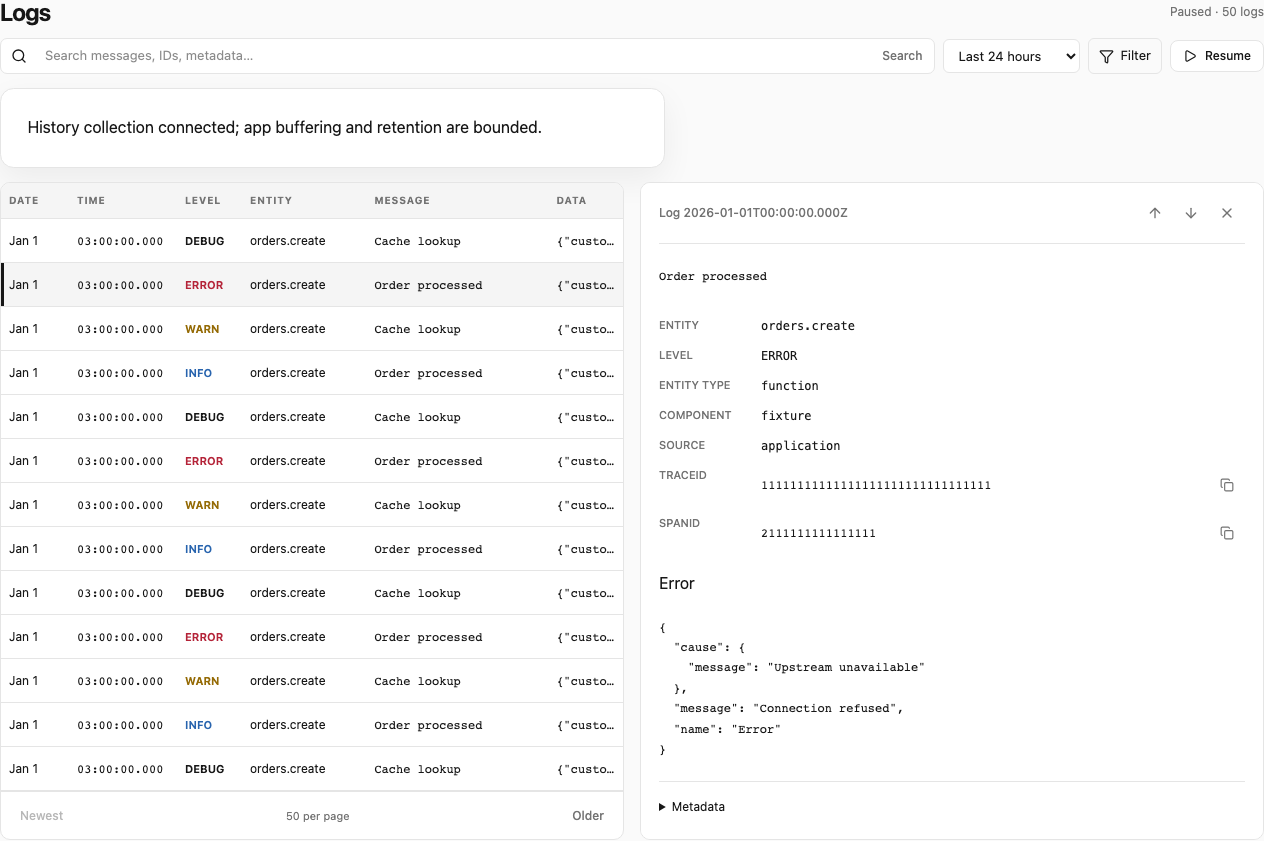
The Logs workspace preserves structured fields and correlation identities. Selecting a record keeps its associated trace beside it so developers and operations teams can move from a symptom to the surrounding execution.
AWS hosting routes redacted structured stdout to CloudWatch through the host integration. CloudWatch is host
logging, not an application exporter, so it does not belong under telemetry.exporters.