Inspector
Follow an active request through routes, functions, graph relationships, diagnostics, logs, traces, and the HTTP API reference.
The Inspector is an optional tool for browsing your running application’s routes, resources, traces, and history. Inspection is optional and disabled by default.
The separate @relkit/inspector package owns the UI and diagnostic history. relkit add inspector
enables the application bridge and installs that package as a project devDependency; relkit inspector
launches it. The tool requires Bun 1.3.10 or newer and Node.js 20.9.0 or newer.
The backend-only development workflow needs no Node.js installation.
relkit jobs reads and controls live provider state on the application backend;
it works independently of the inspector UI and application inspection setting.
Selected jobs retain their native authorization and operation IDs. If the backend
sets RELKIT_INTERNAL_ENDPOINT_TOKEN, set that same admin token explicitly for
the jobs CLI. Logs, request history and traces belong to the separate inspector.
Pre-setup
Start from a running local backend. The steps below install the inspector package and enable its
bridge through defineApp. No new defineEnv values or Docker service are required for the
Inspector itself; retain the backend’s environment and local provider configuration.
Add the inspector
bun run relkit add inspector --project-root .See the relkit add inspector reference for its options. This sets inspector: { enabled: true } in relkit.config.ts, adds @relkit/inspector to
devDependencies, installs it, and adds an inspector script that runs relkit inspector. Nothing is
installed globally. An authored inspector.enabled: false is reported as a conflict, not overwritten.
To install the tool globally instead, the following command uses this checkout’s tool version. Use the compatible published release
containing the standalone Inspector; a successful local candidate check does not publish it. For an
unpublished candidate, install its built .tgz artifact into an isolated tool environment instead of
assuming that version is already on the registry. The backend keeps its lean installation.
Install the standalone tool with Bun 1.3.10 or newer. Tool installation does not enable application inspection.
bun add --global @relkit/inspector@0.1.2A global installation needs Bun’s global binary directory on PATH and does not
enable inspection. Node is required by the tool’s Next UI/history worker, not by the backend-only app.
Enable the application bridge
relkit add inspector already did this. To enable the bridge by hand, merge the explicit inspector
setting into the existing relkit.config.ts, preserving its other options:
/** Explicit development inspection enables the bridge; the standalone UI is launched separately. */
import { defineApp, defineEnv } from "@relkit/app/config";

export default defineApp({ env: defineEnv({}), inspector: { enabled: true } });
The bridge defaults to 127.0.0.1 with an ephemeral port. Its optional
inspector.connection.host and inspector.connection.port settings are separate from the tool’s
UI port, which defaults to 3210. Obsolete inspector.port configuration is rejected.
Follow a request
Start the development runtime
bun run devKeep the backend running. In a second terminal, launch the project-local tool (--port changes the UI port):
bun run inspectorOpen http://127.0.0.1:3210. The tool discovers and authenticates the
running session without evaluating application configuration. Stopping it leaves the backend running.
Send an identifiable request
curl -i http://localhost:3000/hello\?name=Inspector \
  -H "x-correlation-id: docs-inspector"
Inspect the complete path
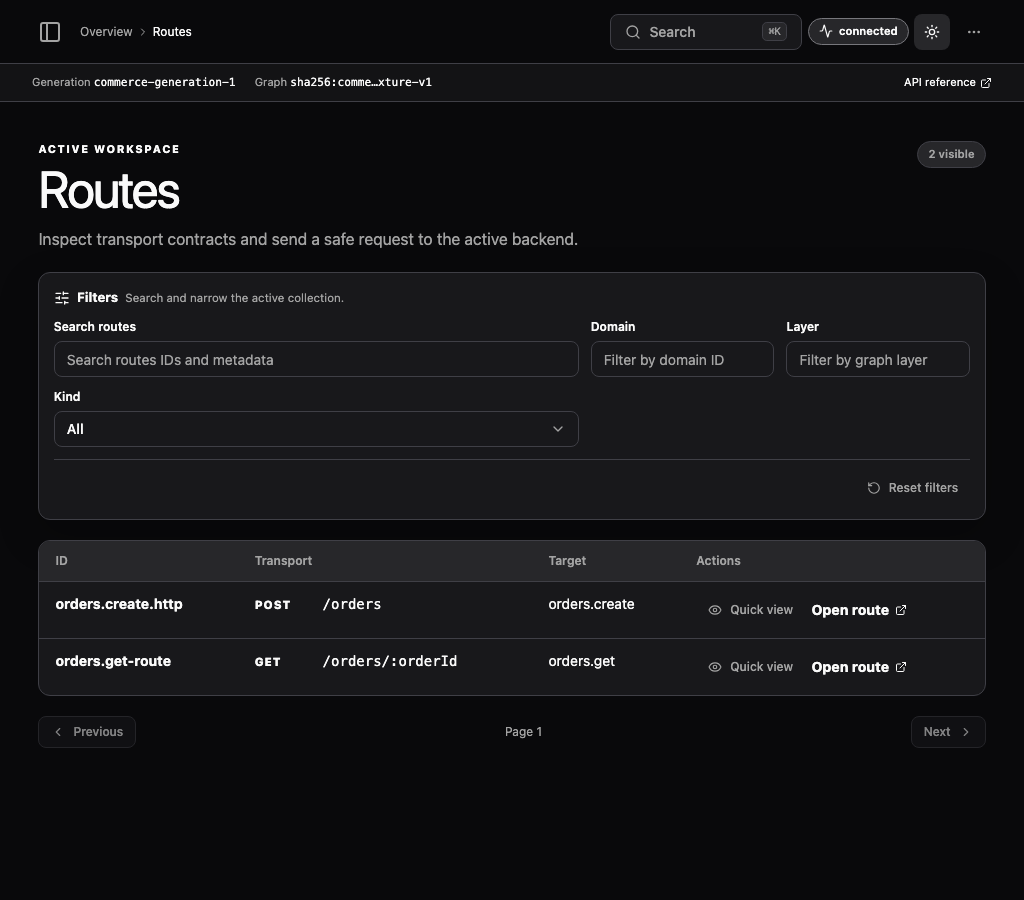
In Requests, select /hello and inspect its route, target function, status, duration, graph hash,
correlation ID, logs, and trace. Follow the route and function links to their descriptor details.
Compare graph and HTTP contract
In Graph, find the route-to-function edge. The relationship table provides the keyboard and screen-reader
equivalent of the canvas. Inspect the HTTP contract at
http://localhost:3000/_relkit/v1/openapi.json. New applications select the Scalar
API Reference (server.apiDocs.ui: "scalar") at http://localhost:3000/_relkit/v1/api-reference;
for older applications, follow the OpenAPI guide to install and select it.
Inspect runtime state
The Logs workspace defaults to application and runtime logs at every level from the last 24 hours. Search redacted messages, components, identifiers, and metadata across retained history. Use Filter to narrow by level, service, function, request, trace, or source; RELKIT lifecycle and Inspector process diagnostics are available through the source filter.
Select a row to read the full message, structured error, copyable correlation IDs, metadata, and associated trace. Desktop layouts keep details beside the table; smaller screens open a detail drawer. Arrow keys move between rows and Escape closes details. Missing or expired records are identified explicitly.
Filters and the selected log are saved in the URL. Live replacement pauses while inspecting a record, scrolling
away from the top, or viewing an older page. New logs available returns to the newest results. Backend reloads
and dev restarts preserve committed history within the configured retention limits. History defaults to
.relkit/observability/observability.duckdb; use the tool’s --history-directory for a persistent override.
Package-runner cache removal does not remove project history. The directory accepts one writer and is
bound to one project identity.
Before the tool connects, the bridge retains a bounded redacted buffer, initially 2,048 records/2 MiB. Overflow, producer delivery failures and interrupted flushing are reported as incomplete capture. The collector acknowledges a session/sequence only after committing it; replay does not duplicate history. Later span revisions remain distinct updates. Diagnostic history is separate from durable application data.
Search and detail views cover services, routes, functions, jobs, events, storage, cache, AI, middleware, integrations, environment contracts, diagnostics, requests, logs, traces, graph relationships, and API contracts. Provider pages show profile, source kind, integration provenance, local recipe state, and infrastructure roles without exposing connection values.
The Jobs area keeps task/job definitions, bounded run pages, schedules, and worker services distinct. Run filters push down stable job/service/status/time identities; unavailable providers are shown as partial rather than as empty history, and closing the Inspector never cancels accepted work.
Generation views expose the composite activation fingerprint. If a new candidate fails graph, manifest, integration-plan, local-service, readiness, or override validation, traffic remains on the last known good generation and the Inspector continues to show that active state.
Resolve common Inspector problems
The Inspector is disconnected
Confirm that the backend is running and inspection is explicitly enabled. With no compatible
live session the tool keeps retrying. With multiple sessions, select a private descriptor
through --connection-file. A reload keeps its session; a full dev restart rotates its
credentials.
The graph looks stale
Read the rejected candidate diagnostic. The Inspector intentionally shows the last valid generation until a replacement passes activation.
A local integration is waiting
Inspect its recipe, plan hash, lease, and override generation, then run bun run relkit local status from the same project root.
Sensitive content is absent
That is expected. Secret values and protected content are removed before local persistence and Inspector transport.
Inspection is development-only. Production builds exclude rich inspection regardless of development
configuration or legacy environment overrides. Private descriptors contain session credentials: keep
.relkit/connections/ private and out of source control. The tool keeps credentials server-side and does
not accept connection paths or network targets from browser requests. Controls retain native application
authorization/operation identity and reject stale generations without blindly retrying mutations.