Events overview
Publish what happened in your app and let other functions react.
An event records that something happened in your application, such as an order being created. Other functions can subscribe and react—for example, sending a confirmation and recording analytics after an order is created.
The original operation does not wait for these reactions to finish. Use events for follow-up work; use a normal function call when you need the result before continuing.
An event consumer may submit a task-first job when the follow-up needs durable execution. Publishing an event is not an atomic database write plus task admission.
Pre-setup
Application events currently use the filesystem provider. It has no Docker recipe; Redis’s cache/realtime adapters do not provide application events. Other configured capabilities can still use local Docker in this same application.
Install the event provider
From this guide’s application/package root, install only its selected requirements:
bun add @relkit/local@0.7.12Keep these owner-specific versions and the lockfile together. Runtime SDKs belong in dependencies; build/type tooling belongs in devDependencies. Installing an adapter does not supply its optional SDK peers or enable the feature’s configuration.
Configure event delivery
/** Application events use the supported filesystem provider, which has no Docker recipe. */
import { defineApp, defineEnv } from "@relkit/app/config";
import { localEvent } from "@relkit/local";

export default defineApp({
  env: defineEnv({}),
  event: localEvent(),
  defaults: { event: "default" },
});
This path requires no credentials or new defineEnv fields. The default profile stores
state under .relkit/state; preserve that directory across restarts. A scaffold may already
have added this binding—reuse it instead of creating a second profile.
Validate the event and consumer
After registering the event and listener, run bun run check, bun run typecheck, and
bun run dev. Follow Handle order events to publish
an event and verify its consumer. Defining an event alone does not run a listener.
The Events API
| API | What you use it for |
|---|---|
defineEvent |
Name the event and define the data it carries. |
defineFunction |
Perform an operation, then publish with context.events[eventId].publish(data). List the event in publishes. |
defineEventFunction |
Subscribe with event: "orders.created" and run your handler when it is published. |
See your subscribers
After installing and binding the event runtime,
start the app. If you choose inspection, complete the separate Inspector setup
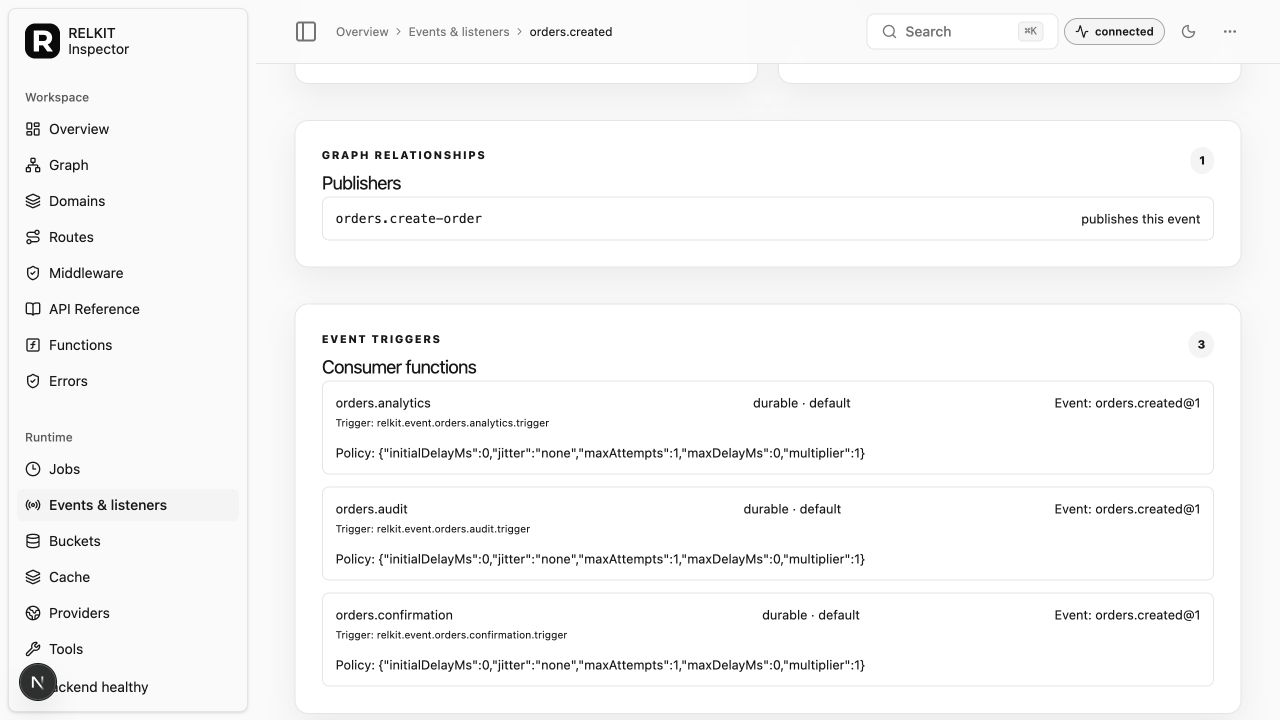
and open its UI at http://localhost:3210. Select Events & listeners, then open an event.
Publishers shows which functions send it; Consumer functions shows its subscribers.
Follow the order confirmation example to publish and consume an event in your existing app. Use Define an event for the descriptor details.